Bandicam Company Launches ZunShot, a Lightweight Screen Capture and Annotation Tool for Windows
With ZunShot, we wanted a capture tool that feels immediate and familiar, while giving people practical ways to refine,
Press Release Disclaimer: This is a press release distributed through the XPR Media network. It has not been independently verified by our newsroom.
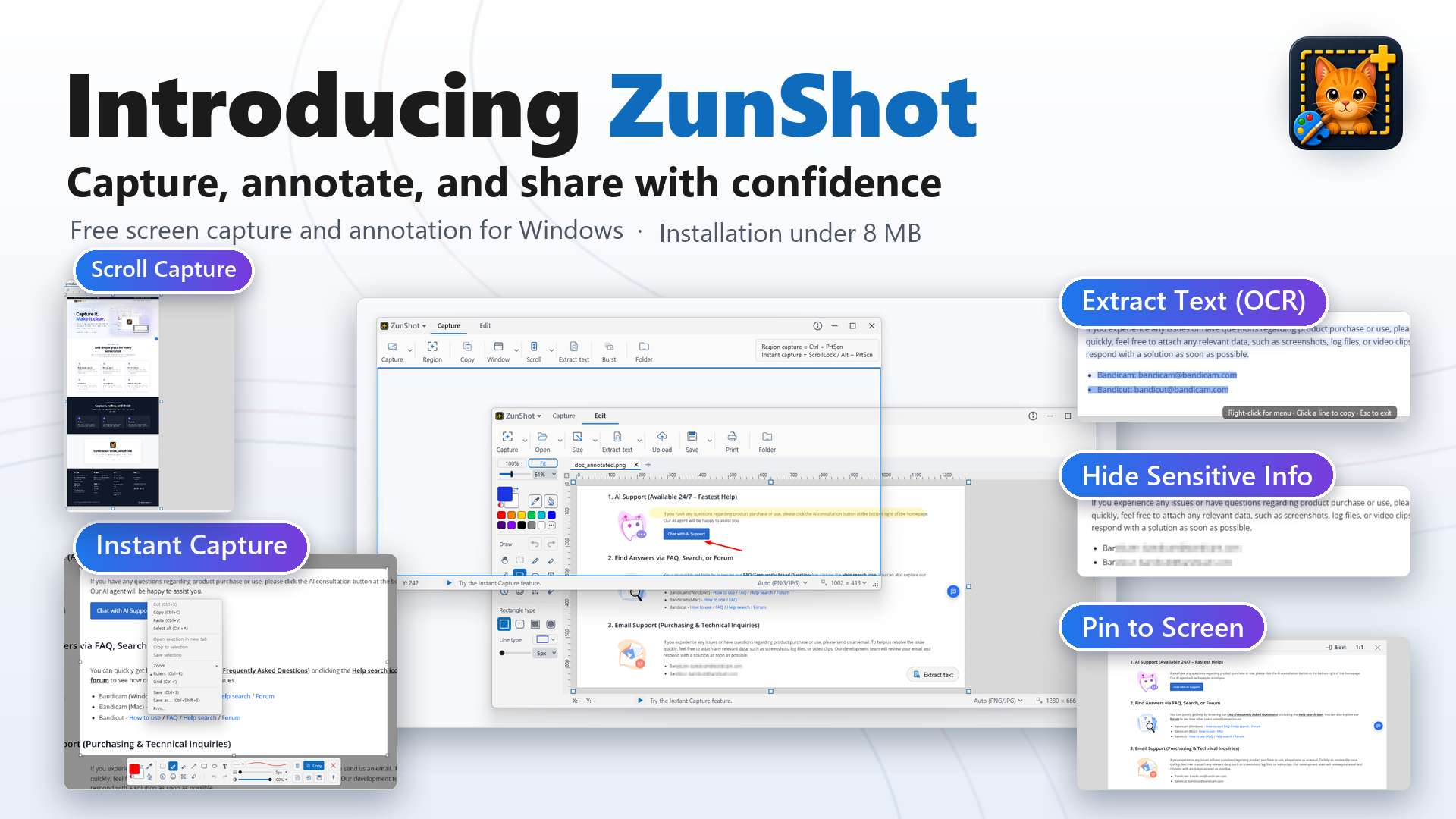

IRVINE, CA, UNITED STATES, October 13, 2026 /EINPresswire.com/ — Bandicam Company, developer of the Bandicam screen recorder, has officially released ZunShot, a dedicated screen capture and annotation program for Windows. ZunShot is built for people who take screenshots to explain, report and document their work: professionals preparing reports and tutorials, support teams documenting issues, educators creating visual instructions, and anyone who needs to capture and share on-screen information quickly.
ZunShot carries over the capture experience Bandicam users already know. A transparent, resizable capture frame shows exactly which part of the screen will be captured before the shot is taken. Users can also capture the full screen, a single window, or a region drawn with their mouse, and global hotkeys let them capture without opening the app first.
“Screenshots are now an essential part of how people explain, report, collaborate and document their work,” said Denny Oh, CEO of Bandicam Company. “With ZunShot, we wanted a capture tool that feels immediate and familiar, while giving people practical ways to refine, extract and safely share what they capture.”
Instant Capture of a Frozen Screen
For screens that are hard to catch at the right moment, ZunShot offers Instant Capture. One key freezes the current screen, and the user then picks the area to capture from the frozen image. Open menus, tooltips, hover states and moving content are captured exactly as they appear, without racing the mouse.
Built-In Annotation
Every capture opens in a built-in screenshot editor with pen, highlighter, shapes, arrows, text and numbered steps, along with crop, resize and rotate options. Users can highlight important details and add explanatory notes without opening a separate image editor. Several images can be opened as tabs, and the session is restored the next time the app starts.
Scroll Capture
Long web pages and documents that extend beyond a single screen can be captured as one tall image with Scroll capture, so an entire page can be shared or archived in a single file.
Extract Text (OCR) and Translate
ZunShot recognizes the text inside a capture so that it can be copied and reused, and can translate the recognized text into another language. Text extraction is free and runs on the PC using the Windows OCR engine.
Hide Sensitive Info
Before an image is shared, ZunShot can find sensitive text in the capture and mask it in one step. It looks for email addresses, phone numbers, national ID numbers, credit card numbers, numbers printed next to labels such as “Tel”, “Fax” or “Customer No.”, and street addresses, and then covers each match with mosaic or a solid redaction. Manual mosaic and redaction tools are also available for anything else.
Pin to Screen, Save and Share
A captured image can be pinned on top of other windows as a reference while the user keeps working. Captures can be saved as PNG, JPG, WebP or PDF, copied to the clipboard, printed, or uploaded directly to Google Drive, Dropbox or OneDrive.
Light on the PC
ZunShot installs in under 8 MB. The only component that stays resident is a small tray icon; the editor opens when it is needed. The user interface is available in 18 languages.
Pricing and Availability
ZunShot runs on Windows 10 and 11 (64-bit). Saving, copying and printing an unedited capture is free with no time limit, and text extraction (OCR) is free as well. Annotated images carry a ZunShot watermark; a ZunShot Pro subscription removes it and is available inside the app for $2.99 per month or $14.99 per year. ZunShot is available now at https://www.bandicam.com/zunshot/ and on the Microsoft Store at https://apps.microsoft.com/detail/9P3RK3QCBZ79.
About Bandicam Company
Since its start, Bandicam Company has developed accessible multimedia software. Originally launching as a reliable PC screen recorder, the platform has grown into a utility used by millions worldwide. With ZunShot, the company extends its lineup from video recording into still-image capture and communication, and remains committed to building practical tools that make on-screen communication easier and more effective.
Claire Kim
Bandicam Company
info@bandicam.com
Visit us on social media:
LinkedIn
Instagram
Facebook
YouTube
X
Legal Disclaimer:
EIN Presswire provides this news content “as is” without warranty of any kind. We do not accept any responsibility or liability
for the accuracy, content, images, videos, licenses, completeness, legality, or reliability of the information contained in this
article. If you have any complaints or copyright issues related to this article, kindly contact the author above.

Media gallery